
SSD (Solid State Drives) are becoming far more common place today. However many people aren’t quite sure why they should switch to drives that are more expensive than their old standard hard drives. There are two big reasons, especially for those in the photography and video business, and they are speed and data security. Hard drives fail, and while back up solutions like cloud storage are good options, I personally made the jump to SSD technology because I don’t always have time to back up work to the cloud while working. So what is SSD and why is it such a big deal?
The technology has been around for a long time, but memory chip costs are finally making it an affordable reality. The easiest way to understand these drives is they are basically large data sticks. What makes them different, and superior to old platter drives is they have no moving parts, fewer moving parts translates to fewer things in a drive that can potentially fail. The chance of failure for old style drives are increased substantially by the normal activities of photographers and videographers, as we make constant writes and rewrites of large files and we move our drives around a lot. The nature of our work causes us to do the two things that attack conventional platter drives the most, we beat them up mechanically (writes and rewrites) and physically (movement shock). SSDs don’t suffer as much from both of these actions.
SSDs are physical memory wafer chips on a circuit board. No moving parts, this makes far more resistant to physical abuse. Placing the drives in ruggedized and rubber coated enclosures like those available from INEO, ($20.99, for USB-C) make the drive both shock and waterproof. Of course within reason, taking the drive scuba diving or throwing it against the wall is probably not a good idea, but it makes the drives far more durable than most consumer drives.
Drives come in two types, models like SAMSUNGs T3, T4 and T5 series ($217.99), these are all in one drives that are plug and go and build your own setups the build your own drive, a less expensive route. You just need to purchase an enclosure and 2.5 inch standard SSD drive. Currently, I am using the 1TB model from Crucial, ($134.99) in the ineo enclosure mentioned earlier.
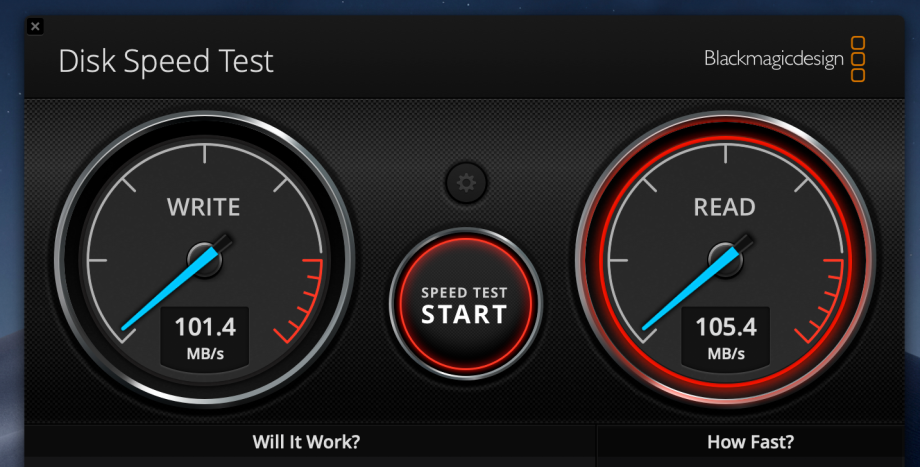
So how much faster are these drives? Here are some benchmarks I made, nothing overly scientific, just plugging two new fresh out of the box drives into my MacBook and running Black Magic Designs Drive benchmark software:
Western Digital, 1 TB USB-C drive:
Crucial, 1 TB USB-C drive:
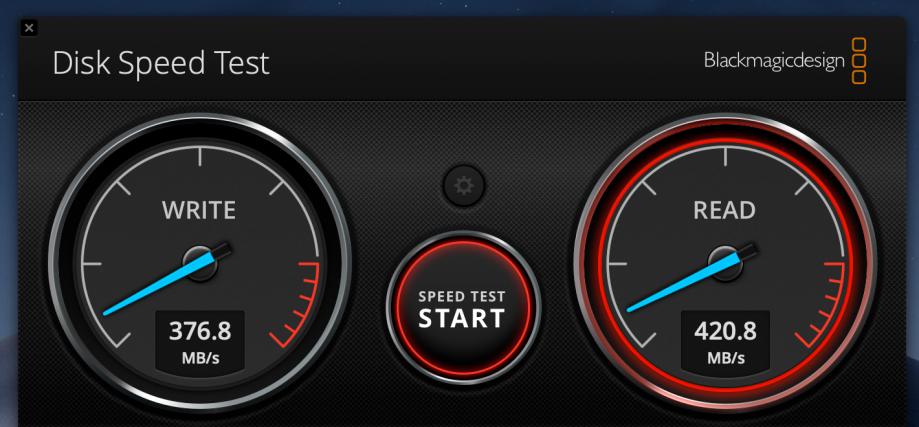
As you can see the results speak for themselves, the SSD drive is almost 4 times faster writing and slightly more than 4X faster when reading. These benchmarks are inline with others I have seen online for other companies drives.
These speed advantages really become apparent when you are moving video files or photographic shoots containing numerous large files.
Last, SSD’s do fail, but their fail rate is far less than equivalent older platter drives. Tom’s Hardware compiled a bunch of studies showing SSD vs HHD fail rates, here is a chart of their results:
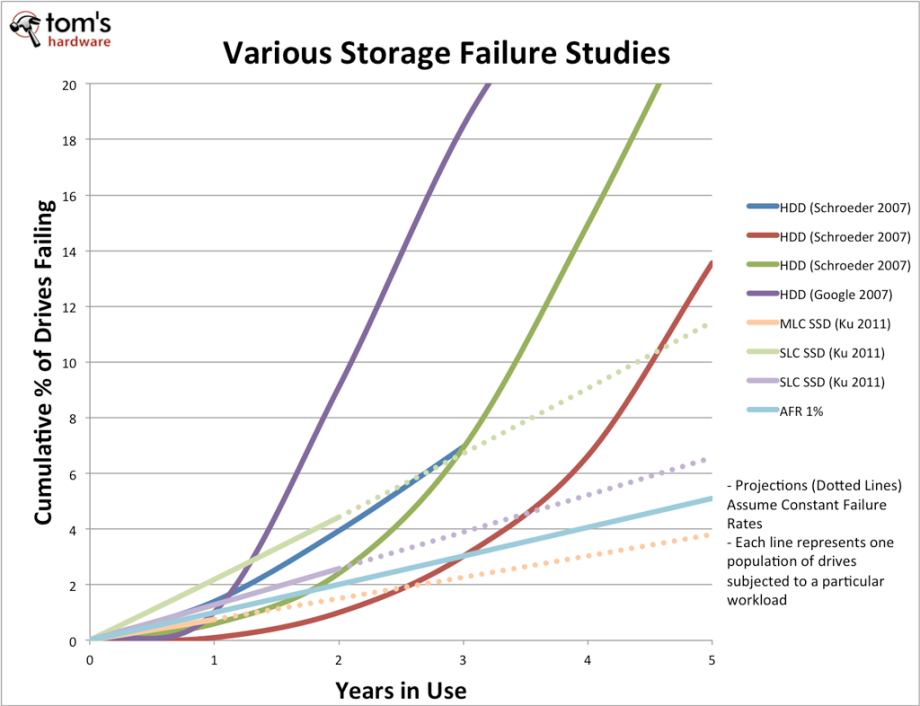
The traditional hard drives fail exponentially faster as they age, demonstrated by their steep curves upward. SSDs however maintain a far lower fail rate, that degrades in a linear relational rate. While the study did not attempt to demonstrate the reasons why the drives failed, my hunch is what I have already said, cumulative continuous shocks to moving parts are probably the main culprit for the older technology.
So if you are looking for more secure and faster storage consider it. MacBooks are now equipped solely with SSD and most internal drives on Windows Machines are either SSDs or can be upgraded to SSD. Don’t be intimidated by building a drive either, this is something that takes about as much time as removing the drive from its theft proof packaging.
 Christopher Bergeron Photography